Chip Grade ID

eMMC / UFS · PH Market Checker · v5.0
Made by amats211 · Free for all 🇵🇭

How to Use This App

A step-by-step guide for identifying eMMC and UFS chips, checking their grade, and saving non-code chips for future reference.

🌐 Works on any web browser · Phone or Desktop
⚠ Step 0 · Find the Right Chip First

Many technicians confuse the eMMC/UFS chip with RAM or the CPU. Here's how to tell them apart. You want the storage chip — the one with the long alphanumeric code.

✓ eMMC Chip
SEC 607 KMR820001M B611 GMK92990
Medium square chip. Has a long code on top like KMRX1000BM or H9TQ26ADFT. Usually Samsung or SK Hynix.
Samsung (KM*) · SK Hynix (H9*) · Toshiba (TY*)
✓ THIS IS WHAT YOU WANT
✓ UFS Chip
SAMSUNG KM8V7001JM B810 UFS 3.1
Slightly smaller, BGA pads on bottom (no visible pins). Code starts with KM8, KM5, KM3, or H9HQ.
KM8* · KM5* · KM3* · KM2* · H9HQ*
✓ THIS IS WHAT YOU WANT
✗ RAM / LPDDR
K4EBE304EB LPDDR4X · 8GB Samsung
Usually wide and rectangular. Code starts with K4E, K4F, or H9H (SK Hynix RAM). Do NOT enter this in the checker.
K4EBE304 · K4F8E304 · H9HKNNNCP
✗ NOT STORAGE — SKIP
✗ CPU / SoC
Snapdragon 665/680/778
Largest chip on the board. Usually labeled Snapdragon, Helio, Kirin, or Exynos. No storage codes. Do NOT enter this.
Snapdragon · Helio · Kirin · Exynos
✗ NOT STORAGE — SKIP
💡 Quick identification tip:
The eMMC/UFS chip you want is usually a medium-sized square or rectangle near the center of the board. It will have a multi-line code printed on it — the longest line is the model number you need to type. Look for codes starting with KMR, KMQ, KMG, KMD, KMW, KMF, KM8, KM5, KM3, H9TQ, H9HQ, H9HP, TYD, TYE or similar.
Where to find it on the board
CPU SoC RAM KMR820 001M-B611 eMMC/UFS ← CHECK THIS PMIC Connector CPU RAM ✓ eMMC/UFS Others
1 Use Camera to Zoom In on the Chip
Tap the 📷 Camera button to open your phone camera. Do NOT use it to automatically identify the chip — the camera is only for zooming in so you can read the small text printed on the chip clearly. 💡 Tip: Use your phone camera's pinch-to-zoom or macro mode to read the chip markings clearly. Good lighting helps a lot. You can also use the Gallery button if you already have a photo. ⚠ The code you need is the longest line on the chip — usually 10–18 characters long. Example: KMRX1000BM or H9TQ26ADFTMCU
2 Type the Chip Code in the Text Box
After reading the chip marking, type the code in the Chip Model Number text box. Type letter by letter — a dropdown list will appear as you type. 💡 You only need to type the first part of the code. For example, typing KMRX will already show matching chips in the dropdown list.
Case 2.1 — Chip shows in the dropdown list
As you type, matching chip codes appear in a list below the text box. Tap any item from the list to select it — the grade, storage size, type, and price will instantly appear below.

Note on variants: Some chips look almost identical on the board but differ by one letter (e.g. KMRX1000BM vs KMRX1000AM). The grade is usually the same — small letter differences (A/M, B/C) are often just production batch codes for the same chip family.
Case 2.2 — Chip does NOT appear in the dropdown
If nothing shows in the dropdown, finish typing the full code then tap 🔍 CHECK GRADE.

A 🌐 Search Online button will appear below. Tap it — it will open a new browser tab with a Google search for your chip code. Look for the storage size (8GB, 16GB, 32GB, etc.) in the search results.

Once you know the GB size, go back to this app tab, select the correct GB size from the buttons shown (e.g. 16GB), then tap ➕ Save as Non-Code.

After saving: The chip is added to your personal Non-Code database. Next time you type that code, it will appear in the dropdown list automatically with its GB size.
3 Read the Grade Result
After checking, the result card shows:
  • Grade — A1 through A5 (A5 is highest quality)
  • Storage size — 16GB / 32GB / 64GB / 128GB / 256GB
  • Chip type — eMMC 5.1, UFS 2.1, UFS 3.1, etc.
  • Manufacturer — Samsung, SK Hynix, Toshiba, etc.
  • Your price — from the My Prices tab
  • Buyer prices — all your saved buyers shown below
💡 Add your buyers and their prices in the BUYERS tab. Their prices will automatically appear every time you check a chip.
4 Other Useful Features
  • BUYERS tab — Save each buyer with their own A1–A5 and GB prices. Shows on every result.
  • NON-CODE tab — View and manage all chips you've saved as non-code.
  • TALLY tab — Count chips and get a grand total. Auto-fill prices from any buyer. Save and share sessions.
  • MY PRICES tab — Set your own personal reference prices for each grade and GB size.
  • REFERENCE tab — View the original chip grade charts used to build this database.
  • HISTORY tab — See your last 30 chip checks with grades and prices.
📌 About Code Variants
Some chips on the board may have slightly different codes from what's in the database. For example, KMRX1000BM-B614 and KMRX1000AM-B614 are the same chip family — the difference in the middle letter (A vs B, M vs L, etc.) is usually a production revision that doesn't change the grade or storage size. If your exact code isn't found, try typing just the first 8–10 characters and see if a matching chip appears.
📷Camera
🖼Gallery
Chip
⚠ Not in grade database

This chip was not found in the graded list. It may be a non-code chip. Select storage size to save it, or search online.

Select storage size:
Disclaimer: For reference only. Prices vary per buyer and market conditions. Do not solely base buying/selling decisions on this app. Developer is not liable for any transactions.
Buyer Price Lists
Non-Code Database

Chips saved here have no grade and are priced by storage size only.

Recent Checks

Your personal reference prices shown on check results. Buyer prices are in the Buyers tab.

Grade Prices (with code)
Non-Code / Capacity Prices
✓ Prices saved
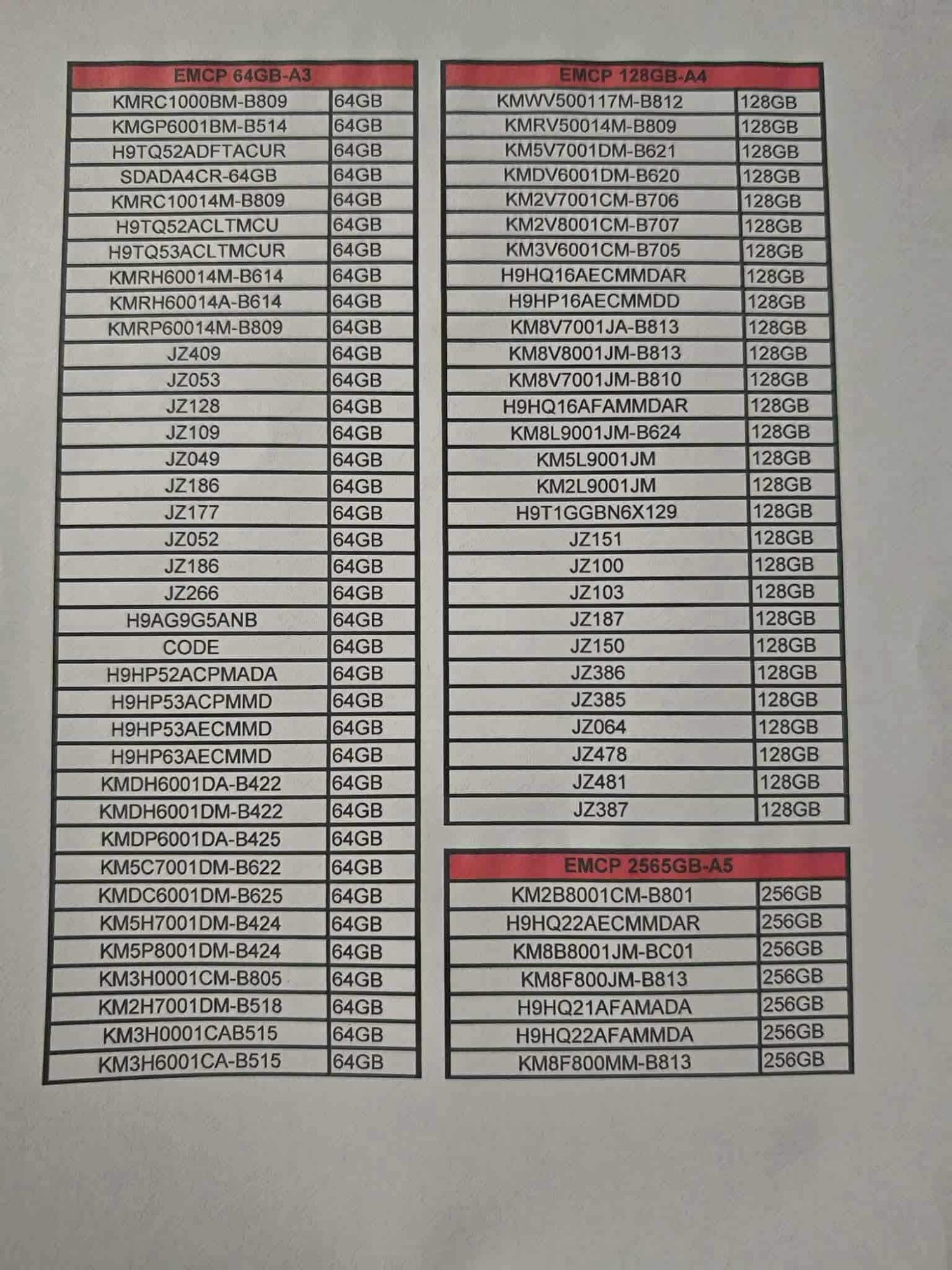
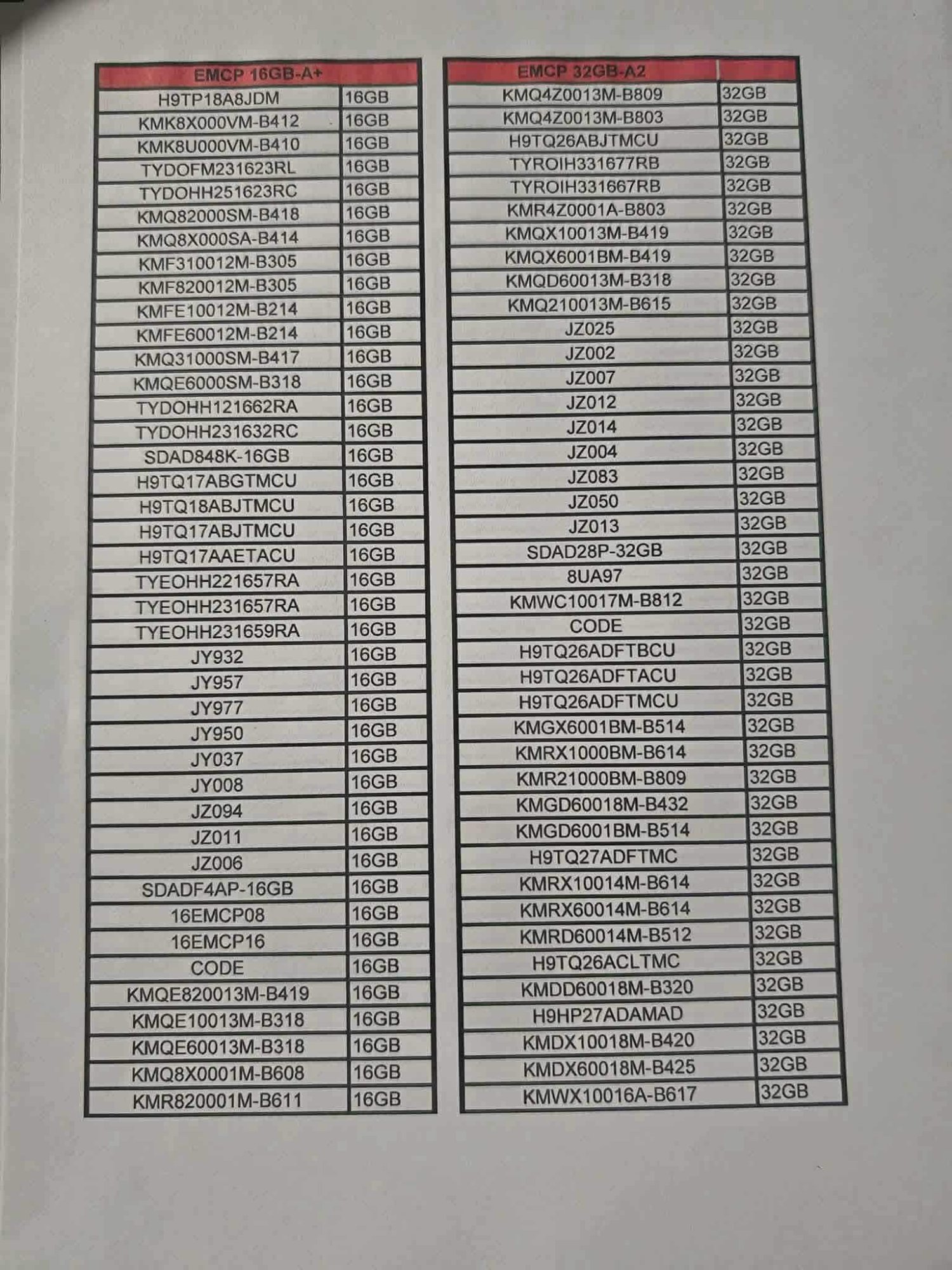
📚 Reference charts are the source of this chip database. A1=16GB · A2=32GB · A3=64GB · A4=128GB · A5=256GB based on the EMCP storage-grade classification. The older spec sheets (showing RAM configs) are also kept as supporting reference. Tap any image to enlarge.
A1 (16GB) & A2 (32GB) — Primary Reference
Source: EMCP 16GB-A+ (A1 grade) and EMCP 32GB-A2 lists. Clear chip model to storage size mapping confirmed from this chart.
A1 and A2 reference
Tap to enlarge · A1 (16GB) and A2 (32GB)
A3 (64GB) · A4 (128GB) · A5 (256GB) — Primary Reference
Source: EMCP 64GB-A3, EMCP 128GB-A4, and EMCP 256GB-A5 lists. Includes UFS combo chips (H9HP*, KM8*, KM2/3/5*) and JZ series.
A3 A4 A5 reference
Tap to enlarge · A3 (64GB) · A4 (128GB) · A5 (256GB)

Grade System (A1–A5)

Grades are based on EMCP storage capacity classification used in the PH repair market:

A5 = 256GB (A++++ / UFS 3.1)
A4 = 128GB (A+++ / UFS 2.x combo)
A3 = 64GB (A++ / eMMC 5.1 high-end)
A2 = 32GB (A+ / eMMC 5.1 standard)
A1 = 16GB (A- / eMMC 5.1 entry)
Non-Code = No grade, priced by GB

📊 Chip Tally Sheet

Enter price per piece and quantity (PCS) for each grade. Totals compute automatically. Use the buyer selector to auto-fill prices.

CODE PRICE (₱) PCS TOTAL (₱)
Grand Total
₱0
0 pieces total
✓ Session saved!
Saved Sessions

What's New — v5.0

⚠ Disclaimer

This app is a FREE REFERENCE TOOL ONLY for identifying eMMC/UFS chip grades.

The developer (amats211) is NOT involved in, responsible for, or liable for any chip buying, selling, or trading transactions.

Prices shown are approximate market references only. Actual prices vary by buyer, location, chip condition, and market demand. Do not solely base any financial decision on this app.

Always verify grades and prices directly with your buyer before transacting.

🇵🇭

Para sa lahat ng Tech!

This is a free gift to all my fellow co-technicians here in the Philippines. Use it freely, share it freely — no bayad, no strings attached.

amats211
FREE FOR ALL · WALANG BAYAD

How to Use

Suggest a Feature

Want a new feature or to report a missing chip?
facebook.com/jay.pidazo

Made by amats211 · v5.0 · Free for all · 🇵🇭